
Check Your Phone's Connected Band
This is a simple experiment: check which base station your phone is currently connected to and what frequency band it's using. Through this experiment, you can intuitively understand the network deployment in your location and verify the frequency band knowledge we learned earlier.
Experiment Goals
- Learn how to view your phone's network connection information
- Identify the current connected band and frequency
- Understand the relationship between ARFCN/NR-ARFCN and actual frequencies
iOS Devices
Entering Field Test Mode
On iPhone, you can enter Field Test mode by dialing a special code:
- Open the Phone app
- Dial
*3001#12345#* - Tap the call button
You will see a hidden diagnostic interface showing current network connection information.
Understanding the Interface
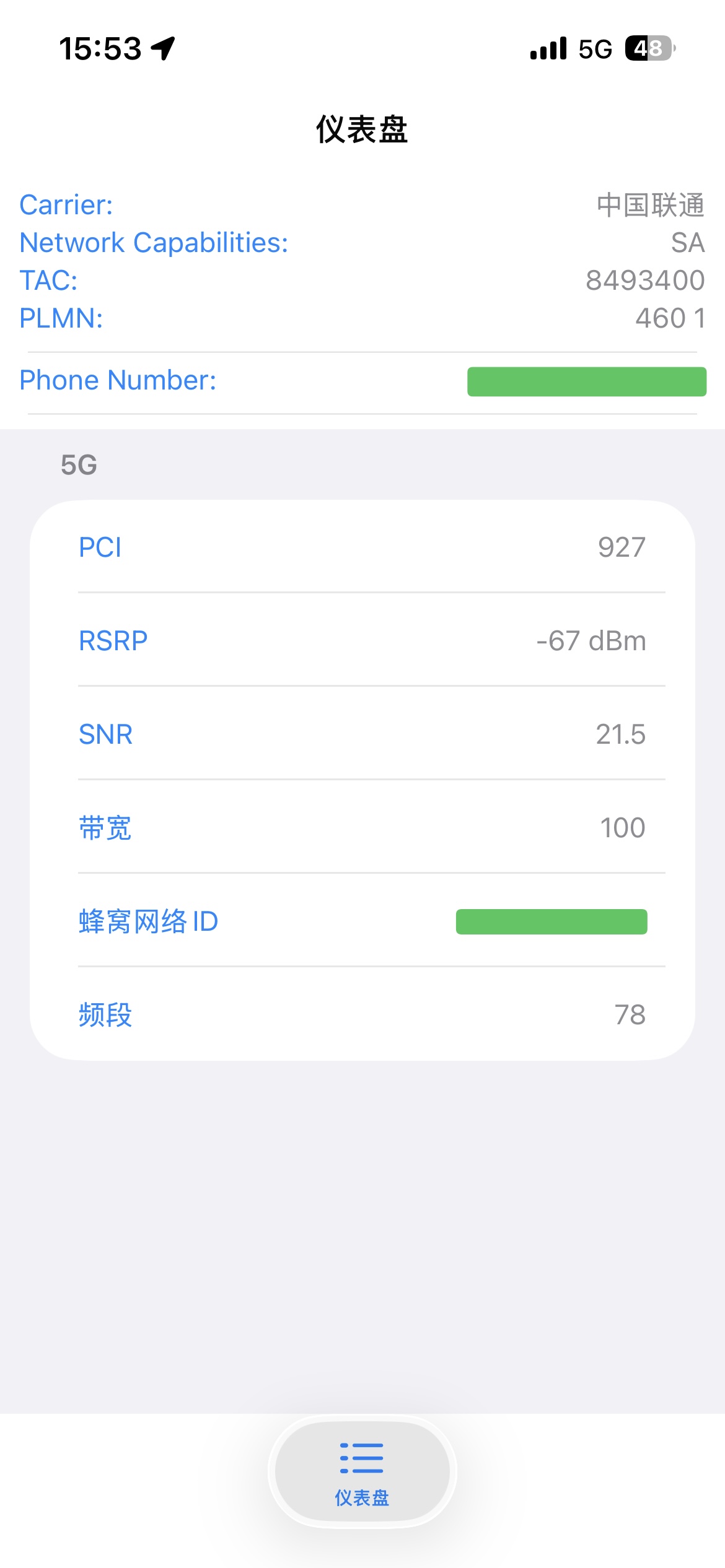
From the image above, we can see:
| Parameter | Value | Description |
|---|---|---|
| Carrier | 中国联通 (China Unicom) | Current carrier |
| Network Capabilities | SA | 5G Standalone mode |
| PLMN | 460 01 | Mobile Country Code (460=China) + Network Code (01=Unicom) |
| TAC | 8493400 | Tracking Area Code |
| PCI | 927 | Physical Cell Identity |
| RSRP | -67 dBm | Reference Signal Received Power (signal strength) |
| SNR | 21.5 | Signal-to-Noise Ratio (signal quality) |
| Bandwidth | 100 | 100 MHz bandwidth |
| Band | 78 | n78 band (3.5 GHz) |
RSRP Signal Strength Reference
| RSRP Range | Signal Quality |
|---|---|
| > -80 dBm | Excellent |
| -80 ~ -90 dBm | Good |
| -90 ~ -100 dBm | Fair |
| -100 ~ -110 dBm | Poor |
| < -110 dBm | Very Poor |
Android Devices
Android doesn't have a built-in Field Test mode, but you can use third-party apps to view detailed network information.
Recommended Apps
| App Name | Description | Download |
|---|---|---|
| NSG (Network Signal Guru) | Powerful, shows detailed 5G NR information | App stores |
| Cellularz | Clean interface, supports multiple network types | Google Play |
| NetMonster | Open source, comprehensive features | Google Play / F-Droid |
NSG Interface Guide
Example 1: China Mobile 5G (n41 Band)
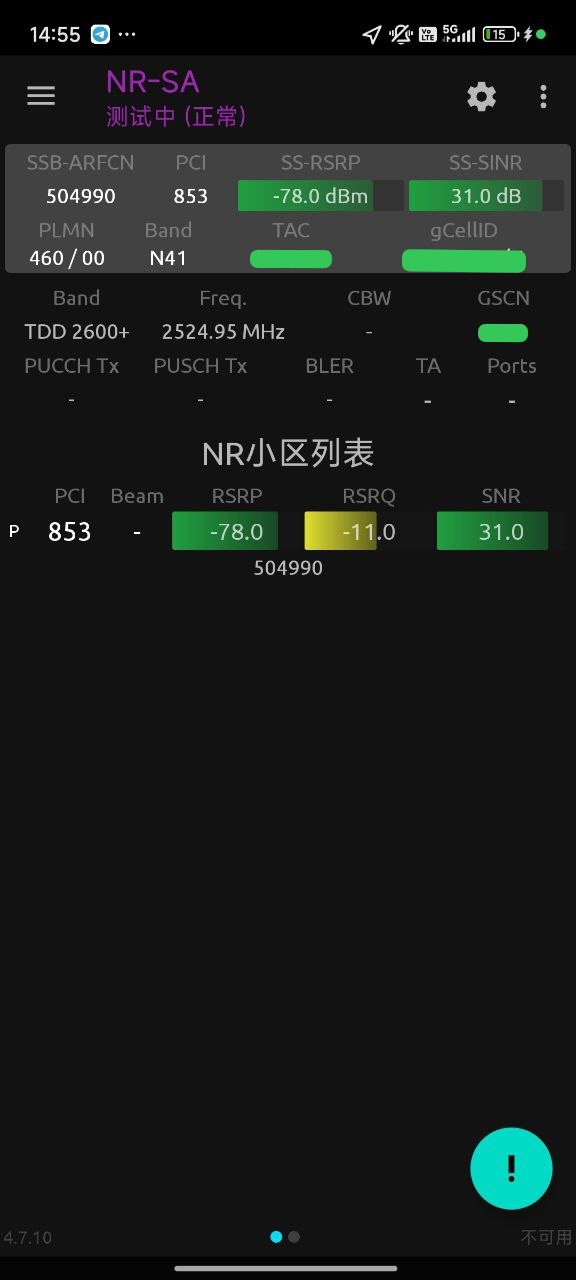
Key information explained:
| Parameter | Value | Description |
|---|---|---|
| PLMN | 460/00 | China Mobile (MNC=00) |
| Band | N41 | n41 band |
| SSB-ARFCN | 504990 | Synchronization Signal Block NR-ARFCN |
| Freq. | 2524.95 MHz | Center frequency |
| Band | TDD 2600+ | TDD mode, 2.6 GHz band |
| PCI | 853 | Physical Cell Identity |
| SS-RSRP | -78.0 dBm | Signal strength |
| SS-SINR | 31.0 dB | Signal-to-noise ratio |
Frequency calculation verification:
ARFCN 504990 falls in 0-3000 MHz range
F = 0.005 × 504990 = 2524.95 MHz ✓Example 2: China Unicom 5G (n78 Band)
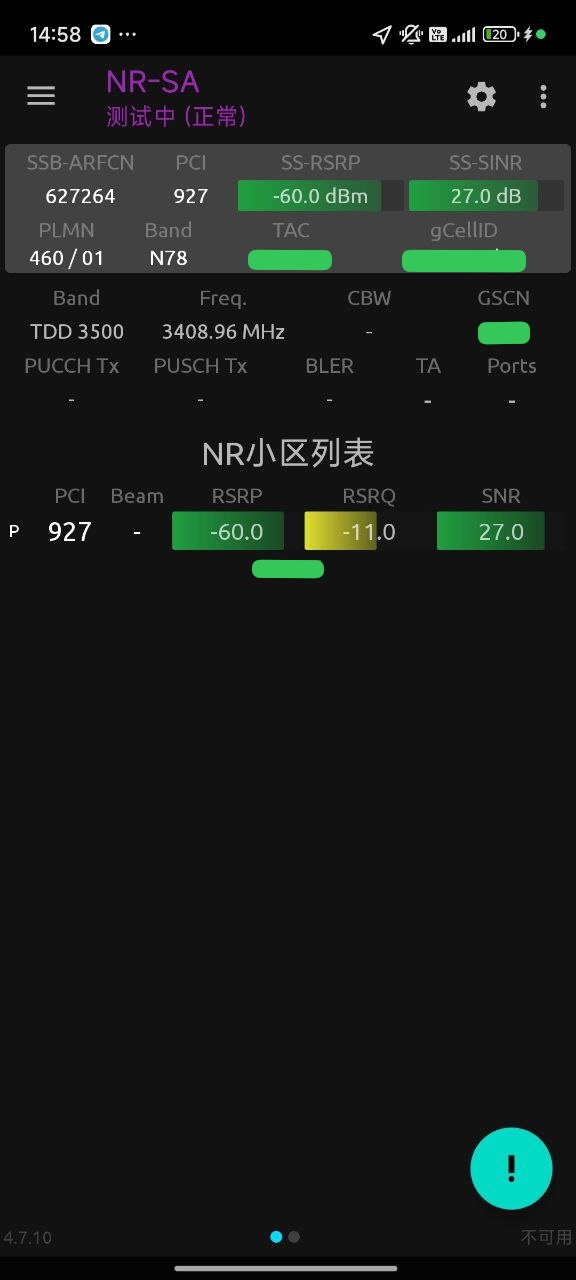
Key information explained:
| Parameter | Value | Description |
|---|---|---|
| PLMN | 460/01 | China Unicom (MNC=01) |
| Band | N78 | n78 band |
| SSB-ARFCN | 627264 | Synchronization Signal Block NR-ARFCN |
| Freq. | 3408.96 MHz | Center frequency |
| Band | TDD 3500 | TDD mode, 3.5 GHz band |
| PCI | 927 | Physical Cell Identity |
| SS-RSRP | -60.0 dBm | Signal strength (excellent) |
| SS-SINR | 27.0 dB | Signal-to-noise ratio |
Frequency calculation verification:
ARFCN 627264 falls in 600000-2016666 range
F = 3000 + 0.015 × (627264 - 600000)
F = 3000 + 408.96 = 3408.96 MHz ✓Practice Exercise
Now it's your turn to try!
Step 1: Check Current Network
Use the methods above to check your phone's current network information and record the following parameters:
- [ ] Carrier name
- [ ] Network type (4G/5G, SA/NSA)
- [ ] Band
- [ ] ARFCN/EARFCN
- [ ] Frequency (if displayed)
- [ ] RSRP (signal strength)
Step 2: Verify Frequency
Using the recorded ARFCN, calculate the center frequency using the frequency calculation formulas and verify if it matches the displayed frequency.
Step 3: Cross-reference Band Table
Refer to the China ISP Spectrum Allocation page to confirm that the band you're using falls within your carrier's allocated range.
FAQ
Why am I seeing 4G instead of 5G?
Possible reasons:
- Phone doesn't support 5G: Check if your phone supports 5G
- 5G toggle is off: Check if 5G is enabled in settings
- No 5G coverage at your location: 5G coverage isn't as widespread as 4G
- Plan restrictions: Some plans may limit 5G usage
Why is the RSRP value negative?
RSRP is measured in dBm to represent signal power. Since wireless signals have very low power after propagation (typically in microwatts), values in dBm are always negative. A larger value (closer to 0) indicates stronger signal.
What's the difference between NSA and SA?
| Mode | Full Name | Description |
|---|---|---|
| NSA | Non-Standalone | 5G relies on 4G core network |
| SA | Standalone | Complete 5G network |
SA mode provides lower latency and more complete 5G features.
Further Reading
- China ISP Spectrum Allocation - Learn about each carrier's band details
- 5G System Architecture - Understand 5G network components
- Spectrum Analysis - Analyze spectrum with SDR devices